
This web site is under construction and contains details of products that will become available in 2024. Details of current DryFire products may be found at: www.dryfire.com
Room and other requirements
To use DryFire you will require:
- A suitable room.
- A suitable wall or screen.
- A suitable laptop or PC.
- A Dryfire Projection System (DPS) or a DryFire Laser System (DLS).
- DryFire software dowloaded from here.
- A PC data projector if you are using DPS. (Note: Wordcraft does not supply projectors.)
- Somewhere to locate everything.
Room
We have seen DryFire installations in barns, sheds, offices, garages, dining rooms, dens, outhouses, factory units, bedrooms and attics - even custom built garden offices!
Garden rooms became very popular during Covid and a good quality one, large enough to run DryFire, would cost between £20,000 and £30,000 in the UK - and you end up with an extra room that can be used for all sorts of purposes: study, games room, quiet room, workshop etc. Planning permission is not normally required for such a room.
- Whatever space you have should be 3m (10') or more wide with a ceiling height of 2.3m or more. "Standard" ceiling height for new-build homes in the UK is 2.4m - just under 8 feet.
- The wall surface should be smooth - not brick, stone, concrete or any rough finish.
- A large projection screen may be used instead of a wall.
- Subdued lighting is essential with no direct light or reflected light on the wall/screen.
- DPS/DLS must be mounted about 1.5m/2.0m from the wall/screen and 0.,6m/1.0m above the floor.
- The laptop or PC should be located for easy access, preferably to one side of the shooting position.
- A square (0.9m x 0.9m) of carpet or rubber mat will mark your shooting position about 2.5m from the wall/screen.
Targets come to you!
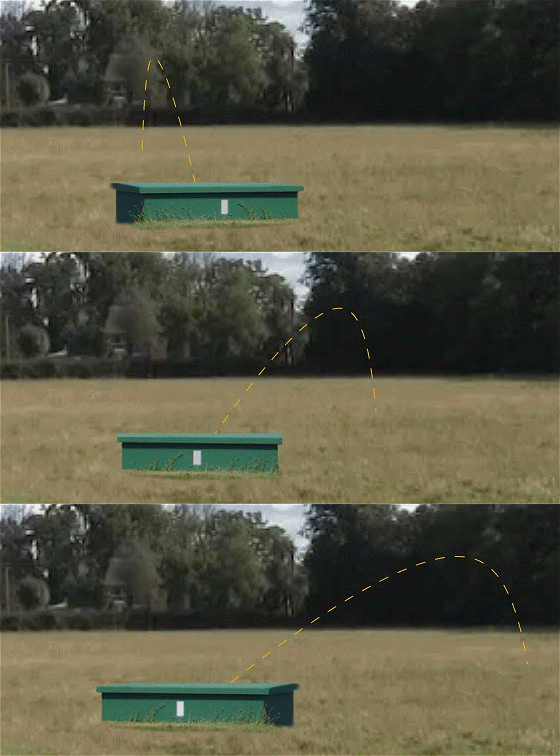
When shooting outdoors you physically move from one stand to another - this means you see the trap (or traphouse) and the clay's trajectory from a different angle.
When shooting indoors with DryFire you stay in the same place - the software changes the angle at which you see the trap and the clay's trajectory.
The example below shows the view from stands 1, 3 and 5 of ATA Trap on the 16 yard line. Obviously the trap will appear further away from the 27 yard line. Note: the software is showing different trajectories from each stand.
The SGA: Standard Gun Assembly and trigger switch (both included with DPS and DLS) will be fitted to the barrel of your gun and the SGA will send out a pulse of infrared light when you press the trigger.
The room shown in the animation below is a spare bedroom, 4.2m square, with a door and large window. The window will require curtains or blinds to keep out direct sunlight which is a source of infrared light.
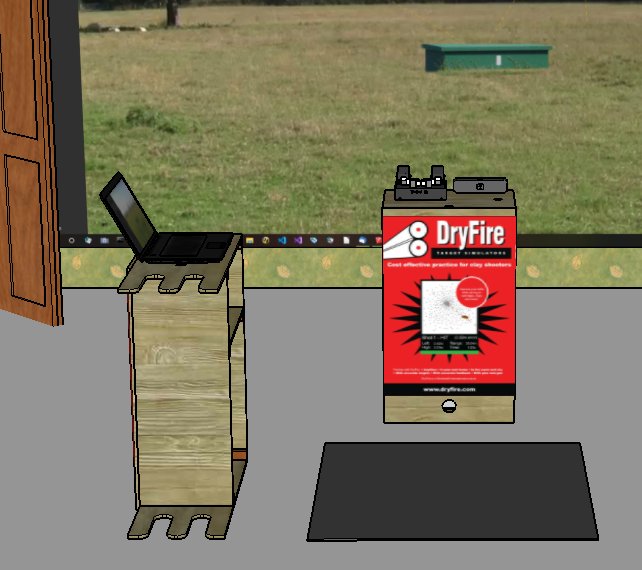
The shooting position is marked with a mat, the simulator is in front of the shooter and the laptop is to one side for easy access and to avoid it getting in the way of gun movement.
Wall or screen?
The further you stand from the wall/screen, the wider the wall/screen must be - so, don't stand too far away - 2.5m (8') is more than enough. See the note below about shooter to wall distance.
You should be taking your shots within your comfort zone - directly in front of you when facing the wall/screen - you should not be chasing crossers into the ground!
You can use a plain wall or a home cinema projection screen with an aspect ratio of 16:9. Large screens are not cheap but they may be brighter than a painted wall. Search for projector paint if you want to try painting a wall.
You have a choice if you find trajectories starting or ending beyond the projected screen image:
- Get a larger screen - or paint a wall.
- Stand closer - and tell the DryFire software you are standing closer. Never stand more than 2.5m from the wall/screen.
PC requirements
You need a PC or laptop running the latest updates to either:
- Microsoft Windows 10/11 (version 1809 or later) or
- Apple MacOS (version 10.14 (Mojave) or later).
The DryFire Laser System (DLS) requires a spare USB port.
The DryFire Projection System (DPS) requires a PC that can support a data projector. The PC also requires Wi-Fi to connect to the DPS Sensor Unit (DPS-SU) and to the Internet.
Projector specification for the DPS version
Wordcraft does not supply projectors - these may be sourced locally.
Using extended mode projection
Projectors can operate in one of two modes:
- Duplicated mode: displays the image as seen on the PC screen.
- Extended mode: displays a totally separate image.
It is like having two screens - the PC one on the left and the extended (projected) one on the right - and your mouse cursor can travel between the two!
You projector must be operating in extended mode for use with DryFire - so make sure you are confident using extended mode before installing the DryFire software.
Ensure the projector's aspect ratio is set to "Native" or "Auto" and that any "Image shift" or "Zoom" features are set to zero.
The projector must display a true rectangular image (no sloping sides!) that fits within the boundaries of the screen or wall being used. No part of the image should be off the screen, on side walls, on the floor or on the ceiling.
This is a sample specification - different projectors will vary:
- Short throw or ultra short throw.
Ultra short throw projectors are recommended since they can be placed very close to a screen or wall.
- Resolution: full HD. 1920 x 1080.
- Aspect ratio: 16:9 native, 4:3 compatible.
- Brightness: 3000 ANSI Lumens or more.
- Contrast: 28,000:1 or better.
- Throw ratio: 0.49:1 (or similar).
- Zoom type: fixed (or variable).
- Projection distance: 0.5 - 3.35 metres.
Locating everything
DLS or DPS may be placed on a flat surface or a tripod.
Take care:
- Tripod legs can be very easy to trip over!
- Make sure your laptop is well to one side so your muzzle doesn't hit it during gun movement.
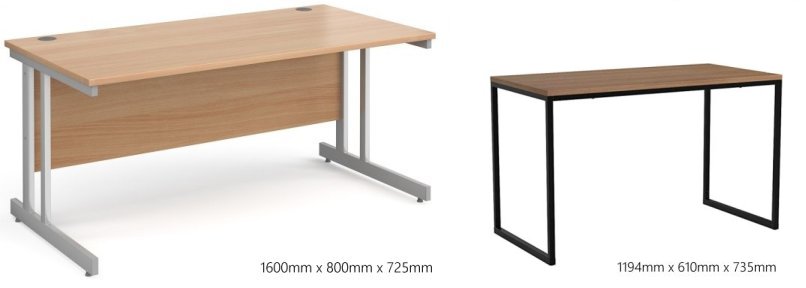
- Some desks and tables are built down to a price and you don't want to risk your laptop and simulator! The office desk on the left is more substantial than the table on the right.
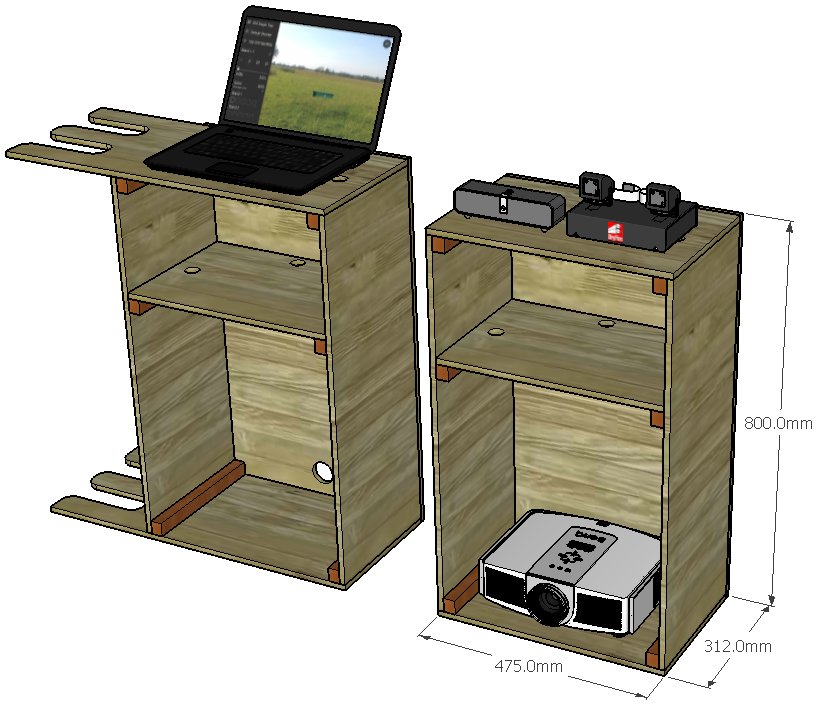
Two simple DIY stands would be ideal - one for DPS/DLS in front of you and one for your PC/laptop to one side. This second stand could include a simple gun rack to rest your gun between rounds.
A local carpenter or cabinet maker could knock them up very quickly if you don't have access to a bench saw.
Both stands can be made from a single 2440mm x 1220mm (8' x 4') sheet of 12mm MDF or plywood with 30mm x 25mm (1.25"x 1") timber as battens. Please click here for a cutting plan. Don't forget to cut the cable holes and gun slots before assembly. Sanding followed by Danish Oil would give a good finish.
Stands in place
The photo below shows the demonstration room at Wordcraft's offices in Belper, England. The screen image is about 3.4m wide and the two stands are as described above. The room has windows on the left and the one closest to the screen has the blinds drawn. The room has subdued lighting but is certainly not dark!

The photo below shows a less than ideal setup (sloping walls, door, light switch, wall sockets) but it works fine for trap targets. The projector is on the floor in front of the DPS stand.

Show us yours!
We love to see how people are using DryFire so email us some photos of your setup and we will send you a free poster! Click on the image below for a larger version.
Note about shooter to wall distance
Feel free to ignore this section if geometry is the last thing you want to think about when shooting!
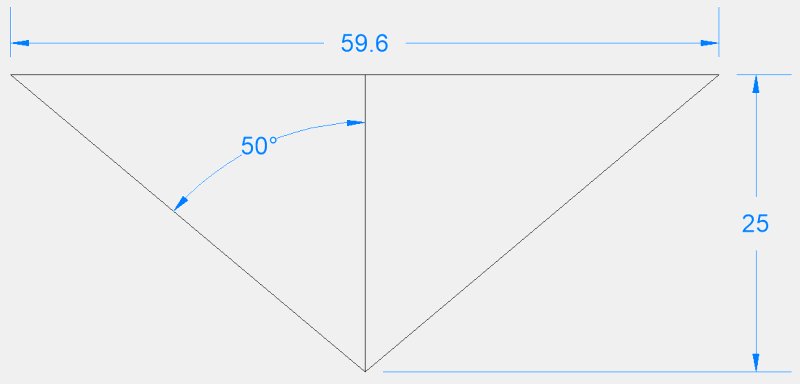
The diagram below shows the shooter's location (bottom centre) and two clays crossing 25m in front. The clays start about 50 degrees left and right of the shooter - rather like skeet station 4.
At that distance and angle the distance between the extremes is just under 60m.
Now let's imagine we were in a room and standing 10m from the wall with the same angle of swing: +/- 50 degrees.
If we stand 10m from the wall it would have to be 23.8m wide - a big room!
If we stand 2.5m from the wall it can be a lot shorter - 6m.
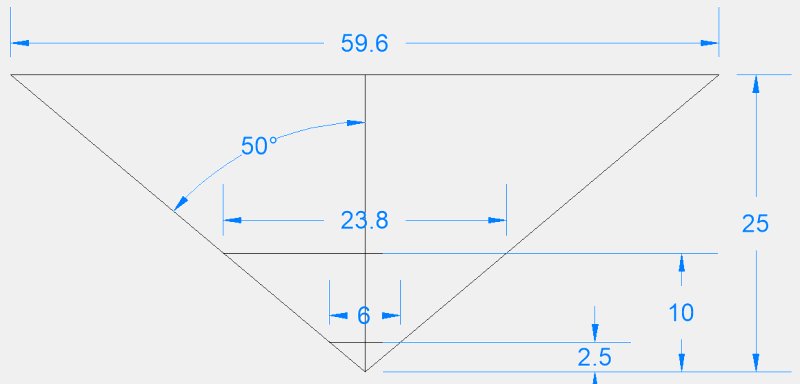
The closer you are to the wall, the less wide it has to be. The DryFire software needs to know that distance so it can generate accurate targets with the same angles you would see when shooting outdoors.
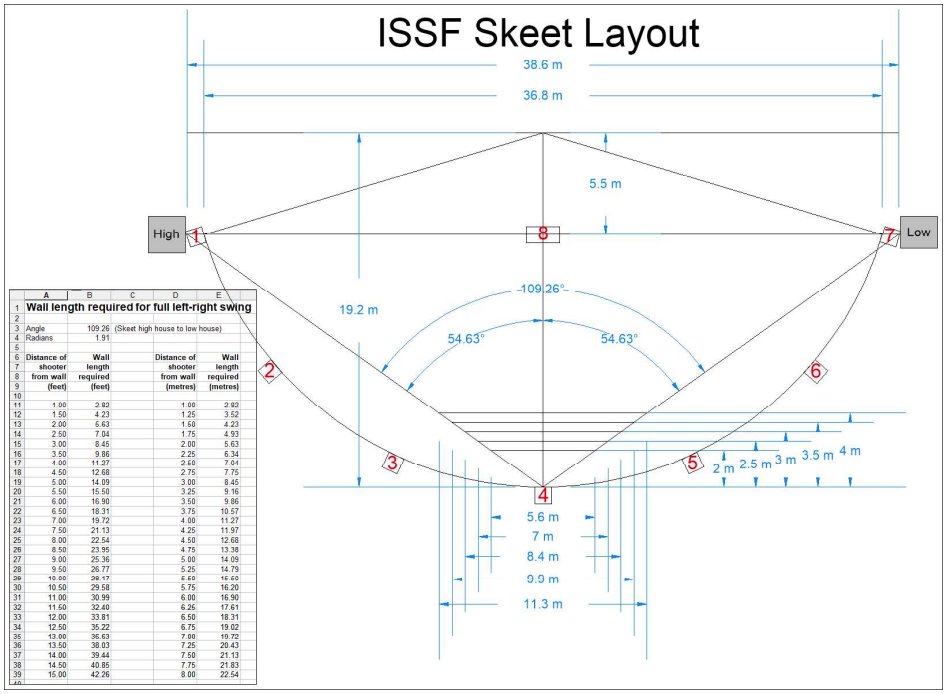
The diagram below shows an ISSF skeet layout and wall distances - a PDF of the drawing is available here.
A less than suitable room!
Some people make do with totally unsuitable rooms - sloping ceilings in this case!
Note: the Universal Gun Assembly (UGA) referred to in the video has been replaced by the Standard Gun Assembly (SGA).